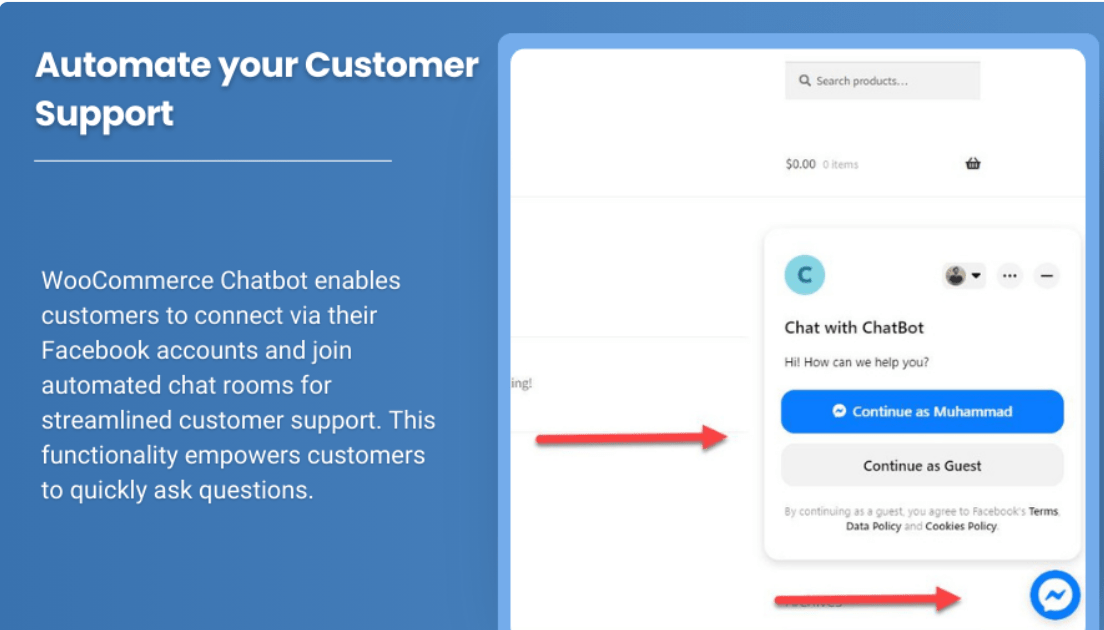
In the fast-paced world of eCommerce, customer experience is key to ensuring satisfaction, retention, and ultimately, sales. One tool that has emerged as an essential asset for online stores is the WooCommerce chatbot. This AI-powered assistant can revolutionize your WooCommerce store by providing immediate support, guiding customers through their shopping journey, and even helping close sales.
Let’s dive into the many ways a chatbot can enhance your WooCommerce store and drive business growth.
Why You Need a Chatbot for Your WooCommerce Store
Customer service is one of the most crucial elements of any successful eCommerce business. However, managing customer inquiries manually can be time-consuming and often lead to delays, especially when dealing with multiple customers at once. This is where a WooCommerce chatbot steps in.
- Instant Responses to Customer Queries: Customers expect immediate responses when they reach out to an online store. A WooCommerce chatbot can provide real-time answers to common questions, ensuring customers never have to wait for assistance.
- 24/7 Availability: Unlike human agents, a chatbot can work around the clock, meaning your customers can receive help whenever they need it—no matter the time of day or night.
- Streamlined Customer Journey: Chatbots can guide customers through the entire purchasing process—from browsing products to completing their checkout. By offering helpful suggestions and addressing questions instantly, chatbots can boost conversion rates and reduce cart abandonment.
- Cost Efficiency: Automating routine tasks with a chatbot allows your team to focus on more complex customer service issues, reducing the need for additional staff.
- Increased Engagement: Chatbots are designed to engage customers and keep them on your site longer, increasing the chances of making a sale.
Key Features of a WooCommerce Chatbot
A WooCommerce chatbot can do much more than just answer basic questions. Here are some of the top features that make chatbots an indispensable tool for your store:
1. Product Recommendations
A smart chatbot can offer personalized product recommendations based on the customer’s preferences, browsing history, or purchase behavior. By analyzing the data, the bot can suggest items that are more likely to appeal to the customer, increasing the chances of additional sales.
2. Order Tracking
Allow customers to easily track their orders through the chatbot. By providing them with real-time updates on their order status, the chatbot enhances the customer experience and reduces anxiety about shipping and delivery.
3. Automated Customer Support
Instead of waiting for an available support agent, customers can resolve their issues instantly using the chatbot. It can help with frequently asked questions like store policies, shipping details, return procedures, and more. If the issue is too complex for the bot to handle, it can escalate the conversation to a live agent.
4. Abandoned Cart Recovery
One of the major causes of lost revenue in eCommerce is cart abandonment. A WooCommerce chatbot can help recover abandoned carts by sending follow-up messages to users who left items in their cart. The bot can remind them of their pending purchase, offer discounts, or provide additional information about the products to encourage them to complete their purchase.
5. Lead Generation
Chatbots can collect customer information in a non-intrusive way, helping you capture potential leads. By asking the right questions, chatbots can build a customer database, which can be useful for future marketing campaigns or remarketing efforts.
6. Easy Integration with WooCommerce
A WooCommerce chatbot seamlessly integrates with your WooCommerce store, making it easy to set up without any technical knowledge. You don’t need to worry about complicated configurations, and the chatbot can be customized to match your store’s tone, style, and goals.
7. Multilingual Support
If your store serves customers from different countries, a chatbot can be set up to support multiple languages, ensuring your customers feel comfortable and understood in their native language.
Benefits of Using a WooCommerce Chatbot
1. Improved Customer Satisfaction
With immediate responses, personalized recommendations, and 24/7 availability, a chatbot significantly enhances the customer experience. By ensuring your customers always get the assistance they need, you can build stronger relationships and foster loyalty.
2. Boosted Sales and Conversions
By providing personalized assistance and guiding customers through the shopping process, chatbots can help increase sales. From recommending relevant products to offering special discounts, a chatbot can influence purchasing decisions and encourage customers to complete their orders.
3. Enhanced Efficiency
The automation of routine tasks, such as answering FAQs and providing order updates, frees up your support team to focus on more complex tasks. This boosts overall efficiency and ensures customers receive timely support.
4. Reduction in Cart Abandonment
Cart abandonment is a common issue in eCommerce. A chatbot can assist in recovering abandoned carts by following up with customers, offering discounts, or simply reminding them about their pending purchase. This can significantly reduce cart abandonment rates and recover lost sales.
5. Personalized Experience for Customers
By tracking customer behavior and preferences, chatbots can offer a more personalized shopping experience. Recommending products based on past purchases or browsing history helps customers find what they need faster, improving their overall shopping experience.
6. Cost Savings
Chatbots reduce the need for a large customer service team, saving you money in the long run. By automating many customer interactions, you can provide better support without the need for additional hires.
How to Set Up a WooCommerce Chatbot
Setting up a WooCommerce chatbot is easy, especially with the right plugin. Here’s how you can get started:
- Choose a Plugin: There are several chatbot plugins available for WooCommerce, each with its own features and functionalities. Some of the top options include Tidio, LiveChat, and WP-Chatbot. Choose one that fits your needs.
- Install and Configure: After purchasing or downloading the plugin, install it on your WooCommerce store. Follow the plugin’s setup instructions to integrate it with your store. Most plugins come with an easy-to-use interface for configuring the chatbot’s behavior, appearance, and settings.
- Customize Your Chatbot: Personalize the chatbot by adjusting its greeting messages, tone, and responses to match your brand. You can also configure the chatbot to answer common customer questions automatically and offer recommendations.
- Test Your Chatbot: Before going live, test the chatbot to ensure it responds correctly to customer queries and provides the necessary support. Make any adjustments based on the feedback you receive during the testing phase.
- Monitor and Optimize: After launch, monitor the chatbot’s performance and track customer interactions. Use this data to improve its responses, enhance its features, and refine its product recommendations.
Conclusion
The WooCommerce chatbot is an invaluable tool that helps streamline your customer service process while improving the overall shopping experience. By automating routine tasks, providing instant support, and driving sales, it offers a range of benefits for both store owners and customers.
Whether you’re looking to enhance customer satisfaction, reduce cart abandonment, or boost conversions, a WooCommerce chatbot can make a significant difference in your eCommerce business. Set it up today and see the positive impact it can have on your store’s growth and success.