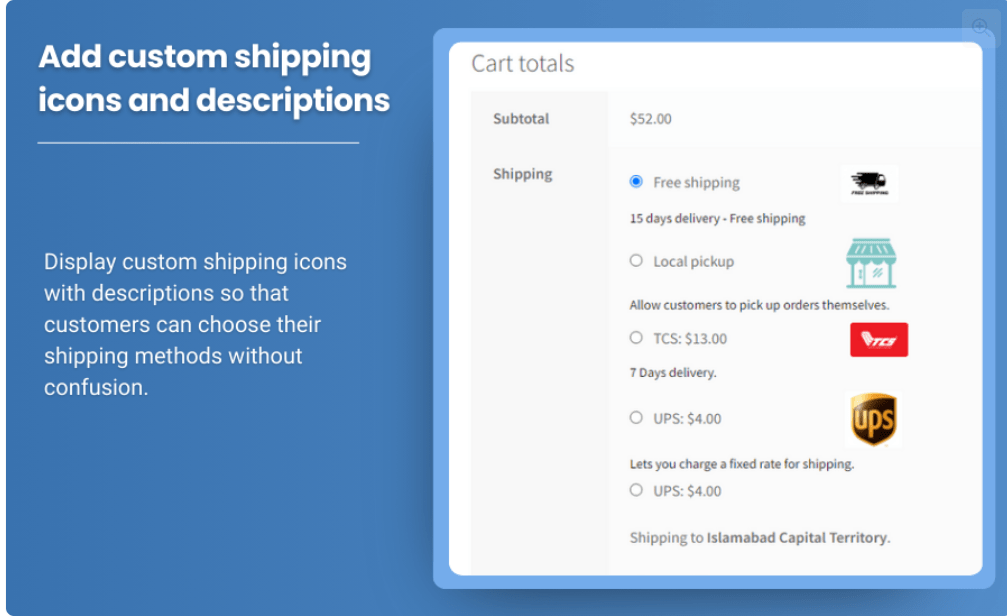
Shipping methods are an essential component of any eCommerce store. They allow customers to choose how they want their products delivered, directly influencing the checkout experience and, by extension, the overall customer satisfaction. However, in many cases, not all shipping methods are relevant to every customer or order. For example, offering free shipping on orders above a certain amount might make standard shipping unnecessary. Similarly, different geographic regions or specific product categories may require tailored shipping methods.
WooCommerce allows store owners to manage shipping methods and display them to customers in a flexible way. One powerful feature is the ability to hide shipping methods under certain conditions. This helps streamline the checkout process, avoid confusion, and improve the overall shopping experience for customers.
Why You Might Want to Hide Shipping Methods in WooCommerce
Shipping methods are not always one-size-fits-all. Different customers may need different options depending on various factors such as their location, cart contents, order value, and more. Hiding irrelevant or unnecessary shipping methods makes the checkout process simpler and more efficient. Here are some reasons why you might want to hide certain shipping methods:
- Show only relevant options: If a customer qualifies for free shipping, for example, showing standard or flat-rate shipping methods could confuse them or create unnecessary choices.
- Product-specific conditions: You may want to display shipping options based on the specific product category or SKU. For instance, certain products might require special handling, so different shipping methods should be shown only for these items.
- Shipping zone-based rules: You can restrict shipping methods based on geographic locations. This is particularly useful for international stores with multiple shipping zones.
- Order value or weight conditions: If a cart meets a specific value or weight threshold, you might want to hide certain methods in favor of others, such as offering free shipping when the total order value exceeds a certain amount.
By hiding shipping methods that are not relevant to the customer’s specific order, you improve the clarity of the checkout process and increase the likelihood of completing a sale.
How to Hide Shipping Methods in WooCommerce
WooCommerce does not natively support the ability to hide shipping methods under specific conditions. However, you can achieve this functionality by using plugins that extend WooCommerce’s built-in shipping options. One of the most popular plugins for hiding shipping methods is the WooCommerce Conditional Shipping and Payments plugin, which allows store owners to apply conditions to the visibility of shipping methods.
Steps to Hide Shipping Methods in WooCommerce
- Install and Activate a Plugin
- To begin, you need to install a plugin that will enable you to hide shipping methods based on conditions. Popular options include WooCommerce Conditional Shipping and Payments, WooCommerce Hide Shipping Methods, and other similar plugins. These plugins are available for download from the WordPress plugin repository or can be purchased from third-party vendors.
- Once you’ve installed the plugin, activate it to enable its features.
- Configure Shipping Methods in WooCommerce
- After activation, go to your WooCommerce settings to configure the available shipping methods. Navigate to WooCommerce > Settings > Shipping to view your shipping zones, methods, and other shipping settings.
- You can configure methods like free shipping, flat-rate shipping, and local pickup in this section.
- Create Conditional Rules
- Once your shipping methods are set up, you can begin creating rules to hide them based on specific conditions. For example:
- Cart Total: Hide standard shipping if the cart total exceeds a certain amount, showing free shipping instead.
- Product Category: Show or hide shipping options based on the products in the customer’s cart. For instance, if a cart contains fragile items, only display shipping methods suitable for these items.
- Shipping Zones: Restrict shipping methods to specific geographic locations. If a customer is outside of a defined shipping zone, you can hide methods that aren’t available in that zone.
- Payment Method: Hide certain shipping methods based on the payment gateway selected. For example, if the customer chooses to pay with a specific payment method, you may want to offer expedited shipping options.
- Once your shipping methods are set up, you can begin creating rules to hide them based on specific conditions. For example:
- Test and Verify Settings
- Once you’ve configured your rules, it’s essential to test the checkout process to ensure that the correct shipping methods are displayed or hidden based on the conditions you’ve set. Use different scenarios such as varying cart totals, product categories, and customer locations to verify the functionality of the rules.
Benefits of Hiding Shipping Methods
Hiding shipping methods in WooCommerce offers a wide range of benefits for both store owners and customers. Below are some of the most significant advantages:
- Improved Customer Experience
When only relevant shipping options are shown, the customer doesn’t have to sift through multiple choices. This reduces confusion and helps customers make decisions more quickly, improving the overall shopping experience. - Increased Conversions
A simplified checkout process is less likely to cause cart abandonment. When customers see only the shipping options that apply to their order, they are more likely to proceed to the payment stage, resulting in higher conversion rates. - Reduced Decision Fatigue
Providing too many shipping options can overwhelm customers, especially if some of them are irrelevant to their situation. By hiding unnecessary methods, you make the decision process smoother and faster. - Enhanced Efficiency
By displaying only the most relevant shipping methods, store owners reduce the chances of customer inquiries or confusion related to shipping, leading to smoother day-to-day operations. - Cost Efficiency
Hiding certain shipping options can also help store owners manage their shipping costs better. For instance, you might only want to offer free shipping to high-value orders, or restrict express shipping to specific geographic regions. This helps optimize logistics and cost management.
Best Practices for Hiding Shipping Methods in WooCommerce
To get the most out of the ability to hide shipping methods, consider implementing the following best practices:
- Clear Communication
Always inform customers about why certain shipping methods are not available. This can be done by adding a message or tooltip next to the available shipping options. For example, “Free shipping is available for orders over $50,” or “Expedited shipping is unavailable for your location.” - Use Conditional Logic Thoughtfully
While it’s important to show only relevant shipping methods, be careful not to over-complicate the conditions. If you hide too many options, it might lead to frustration or confusion for customers. Always keep the user journey in mind when setting up conditional rules. - Test Regularly
After making any updates to your shipping methods or conditional rules, be sure to test the checkout process thoroughly. Ensure that the correct shipping methods are displayed or hidden for different customer scenarios, and that no bugs or conflicts occur. - Ensure Mobile Compatibility
With the increasing use of mobile devices for online shopping, it’s essential to ensure that your hidden shipping methods function properly on mobile screens. Test the hidden shipping rules on mobile devices to ensure the checkout experience is smooth across all platforms. - Keep Shipping Costs Transparent
While hiding unnecessary shipping methods is important, you should still be transparent with your customers about shipping costs and conditions. Avoid hiding fees or making the shipping process feel opaque, as this can reduce trust and create dissatisfaction.
Conclusion
Hide Shipping Method For WooCommerce is an excellent way to create a smoother, more personalized shopping experience for your customers. By showing only the most relevant options based on cart contents, customer location, and other factors, you can reduce confusion, streamline the checkout process, and improve conversion rates. Whether you’re offering free shipping for high-value orders or showing specific methods based on shipping zones, WooCommerce’s flexibility combined with the right plugins allows you to tailor the shipping experience to meet your business needs.
By implementing this functionality strategically, you can provide a much more tailored, efficient, and satisfying experience for your customers, ensuring they make it to the checkout and ultimately complete their purchases.