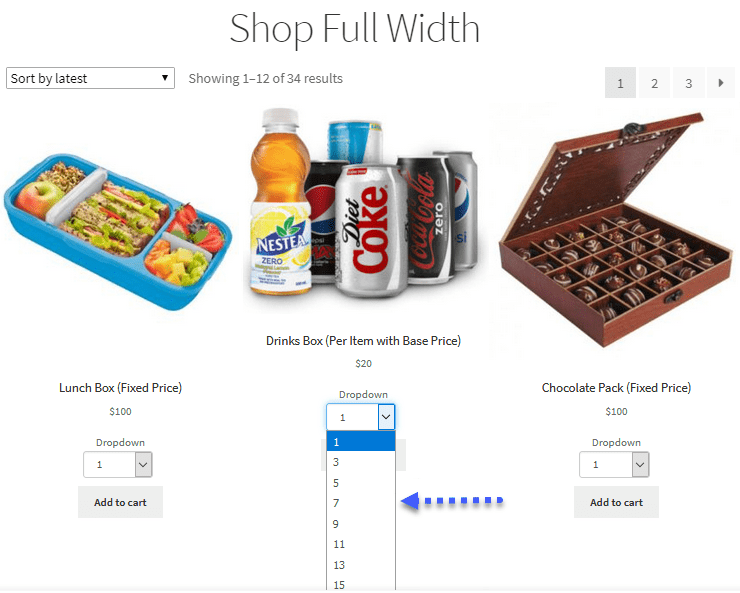
Managing inventory effectively and ensuring profitable sales is crucial for any eCommerce business. Implementing WooCommerce min max Quantities strategies can help you control how customers purchase your products, optimize operations, and increase revenue. By setting restrictions on the minimum or maximum order quantities, you create a system that benefits both your business and your customers.
This article delves into the importance of WooCommerce Minimum Order Quantity rules, how to implement them, and how Extendons can help streamline the process.
What Are WooCommerce Min Max Quantities?
WooCommerce min max Quantities refers to setting minimum and maximum limits on product purchases in your store. These strategies dictate how many units a customer must buy or how many they can purchase in a single order.
For example:
- Minimum Quantity: A customer must purchase at least 5 units of a product.
- Maximum Quantity: A customer cannot purchase more than 20 units of a product.
These restrictions are versatile and can be applied to:
- Individual products.
- Product categories.
- Entire orders.
Why Use Min Max Quantity Strategies?
1. Encourage Bulk Purchases
By setting a WooCommerce Minimum Order Quantity, you can incentivize customers to purchase more, boosting sales volume.
2. Prevent Stock Depletion
Limiting maximum quantities ensures that high-demand products are available for more customers.
3. Optimize Logistics
These rules help you streamline inventory management and shipping processes.
4. Enhance Profit Margins
Encouraging larger purchases can reduce operational costs and increase revenue per order.
5. Create Fair Purchase Policies
Limiting maximum quantities prevents hoarding and ensures equitable access during high-demand periods.
How to Implement WooCommerce Min Max Quantities
Step 1: Choose the Right Plugin
To set up and manage WooCommerce min max Quantities, you need a reliable plugin. Some top options include:
- Extendons WooCommerce Min Max Quantities Plugin
Extendons offers a powerful tool to implement minimum and maximum order limits effortlessly. It provides advanced customization options for specific products or global settings. - Min/Max Quantities by WooCommerce
This plugin is suitable for basic implementations and integrates seamlessly with WooCommerce. - Advanced Dynamic Pricing
Besides min/max rules, it includes pricing strategies for further optimization.
Step 2: Install and Activate the Plugin
- Navigate to your WordPress dashboard.
- Go to Plugins > Add New.
- Search for the plugin (e.g., Extendons WooCommerce Min Max Quantities Plugin).
- Click Install and then Activate.
Step 3: Configure the Plugin
Once activated, follow these steps:
A. Set Minimum and Maximum Quantities
- Go to WooCommerce > Settings > Min Max Quantities.
- Define rules for individual products, categories, or the entire cart.
- Example configurations:
- Minimum quantity: 5 units.
- Maximum quantity: 50 units.
B. Apply WooCommerce Minimum Order Quantity
Set a rule requiring a minimum total order amount (e.g., $50) or a minimum number of items in the cart.
C. Customize Messages
Add custom error or notification messages that inform customers about the rules. For example:
- “You must purchase at least 3 units of this product.”
- “You cannot purchase more than 10 units of this item.”
D. Test and Launch
Preview the settings on your store to ensure the rules are applied correctly.
Practical Examples of Min Max Quantity Strategies
1. Wholesale and Bulk Sales
For wholesale customers, set a WooCommerce Minimum Order Quantity to ensure bulk purchases, such as a minimum of 20 units per order.
2. Limit Promotional Products
During a sale, limit the maximum quantity to 2-3 items per customer to prevent hoarding.
3. Encourage Multi-Item Purchases
Apply a minimum cart quantity rule requiring at least 5 items in the cart to qualify for free shipping.
4. Seasonal Demand Management
For high-demand seasonal products, limit purchases to ensure availability for more customers.
Tips for Effective Min Max Strategies
1. Analyze Customer Behavior
Use sales data to determine the most appropriate minimum and maximum quantity limits for your store.
2. Communicate Clearly
Display clear messages about the rules on product pages, cart, and checkout.
3. Apply Rules Strategically
Tailor the rules based on product type, seasonality, or customer segments.
4. Offer Discounts for Larger Orders
Encourage customers to meet the minimum quantity by offering bulk discounts or free shipping.
5. Monitor and Adjust
Regularly review the effectiveness of your strategies and adjust based on customer feedback and sales trends.
Best Plugins for WooCommerce Min Max Quantities
1. Extendons WooCommerce Min Max Quantities Plugin
Extendons provides a robust solution to set minimum and maximum quantity limits for products or categories. Key features include:
- Flexible rules for products, categories, and carts.
- Easy-to-use interface for managing restrictions.
- Customizable notifications for customers.
2. Min/Max Quantities by WooCommerce
This official WooCommerce plugin is straightforward and ideal for basic min/max settings.
3. Advanced Dynamic Pricing
This plugin offers additional pricing strategies, making it a great choice for dynamic pricing and quantity control.
Check out the useful insight about the Customize my Account page to enhance your store’s shopping experience!
FAQs
1. What are WooCommerce min max Quantities?
WooCommerce min max Quantities refer to rules that set minimum and maximum purchase limits for individual products, categories, or entire orders.
2. Why should I use WooCommerce Minimum Order Quantity rules?
Setting a WooCommerce Minimum Order Quantity ensures larger orders, improved profit margins, and streamlined logistics.
3. Can I apply different rules for different products?
Yes, with plugins like Extendons WooCommerce Min Max Quantities, you can apply unique rules to specific products or categories.
4. Are customers notified about these restrictions?
Yes, most plugins allow you to display custom messages informing customers about the min/max rules.
5. Is there a plugin recommended for advanced features?
The Extendons WooCommerce Min Max Quantities Plugin is a top choice for its advanced customization options and user-friendly interface.
Conclusion
Implementing WooCommerce min max Quantities strategies is a powerful way to optimize sales, enhance inventory management, and increase profit margins. By setting minimum and maximum purchase limits, you can create a system that balances customer needs with your business goals.
With tools like Extendons’ WooCommerce Min Max Quantities Plugin, you can easily implement these strategies and customize them to fit your store’s unique requirements. Start using these strategies today to maximize your revenue and streamline your operations!