
QuickBooks Error code 1328 is an update error in QuickBooks and this comes as “Error 1328. Error updating file (Directory):\Config.Msi\PT19C6.tmp. System error -1072807676.” The main reasons behind this error could be attributed to corrupted system or installer files, such that when the user tries to update QuickBooks, this error immediately appears. This article shall discuss the ways of resolving “ QuickBooks Error Code 1328”. Thus, keep reading!
What causes QuickBooks error 1328?
This update issue in QuickBooks is caused by:
- Corrupted or invalid registry keys.
- Computer experiencing frequent shutdowns when updating QuickBooks desktop.
- Malware or some threatening virus damaged the QuickBooks installer files, or the Components like NET Framework or MSXML.
- The system was configured incorrectly, or a third-party program changed the configuration.
- Poor network connection may also cause Error 1328 to occur.
How can QuickBooks Error 1328 be fixed?
There are multiple strategies to resolve this update error 1328 in QuickBooks. These include:
- Renaming the Conig.msi file
- Running QuickBooks Install Diagnostic Tool
- Update Windows
- Using System File Checker
- Repairing QuickBooks Desktop
- Clean Install QuickBooks
Strategy 1: Renaming the Config.msi File
- Search “msi” file in the C drive and on locating it, rename it
- Just add up “.old” at the end of the file name.
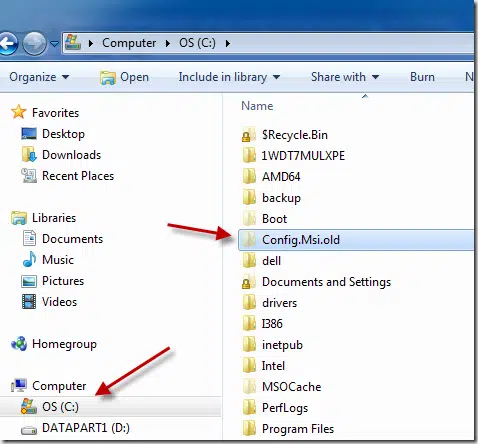
- Now, run QB and try the update again. This should take care of Error 1328 during the update process.
Strategy 2: Run QuickBooks Install Diagnostic Tool
- Set up QuickBooks Tool Hub (Download it from Intuit).
- After that, launch the tool and go for “Installation Issues” tab, then run “ QuickBooks Install Diagnostic Tool”.

- This will scan QuickBooks for installation issues and will immediately fix them.
- When done, try the QuickBooks update again.
Strategy 3: Update Windows
- Go to Start, thereafter to Settings, and then Update and Security.
- Open Windows Update and then, check for updates.

- Download the important updates and install them after restarting the PC.
Strategy 4: Repair QuickBooks Desktop
- Open Control Panel, then go to Programs and Features.
- Choose QuickBooks, then go for the Uninstall tab.

- Then click on Repair.
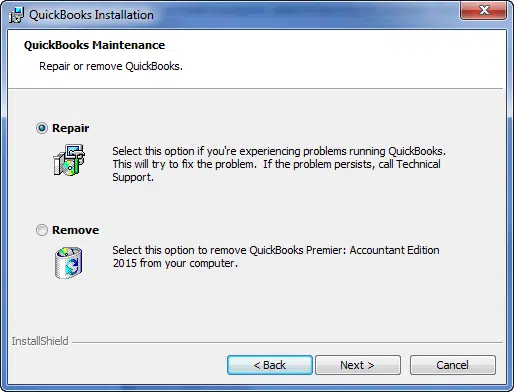
- Head for a system restart and later when the desktop loads up, run QB to try the updates again.